SONARIS

Your sound. Every app. Fire and ice.

Every app with its own volume, its own sound and its own output device: music on the speakers, the movie on your headphones, the game on your display speakers. Plus a master equalizer, instant AirPods detection, no driver – and a DJ mixer with an AI DJ. For the Mac.

⬇ Try it for free See the DJ mixer Order Pro

📲 Send the link to my Mac
Sonaris runs on the Mac – just send yourself the page.

Free demo, no sign-up. Pro from €3.99 per month or €59.99 once, forever, VAT included.

✓ Checked and notarized by ApplemacOS 14.2+Apple silicon & IntelGerman & English

The Sonaris Sound Stage
3.21.14current version
0.01%distortion with loud bass
+10 dBlouder, clean (Ultra)
825sounds on the pads

Sonaris 3.21.14 – what's new CURRENT

The DJ mixer takes a big leap: two outputs with headphone cueing, eleven mix styles, faders, a coloured waveform and new effects. All changes per version are listed under Versions.

🔊

Everyone hears what they should

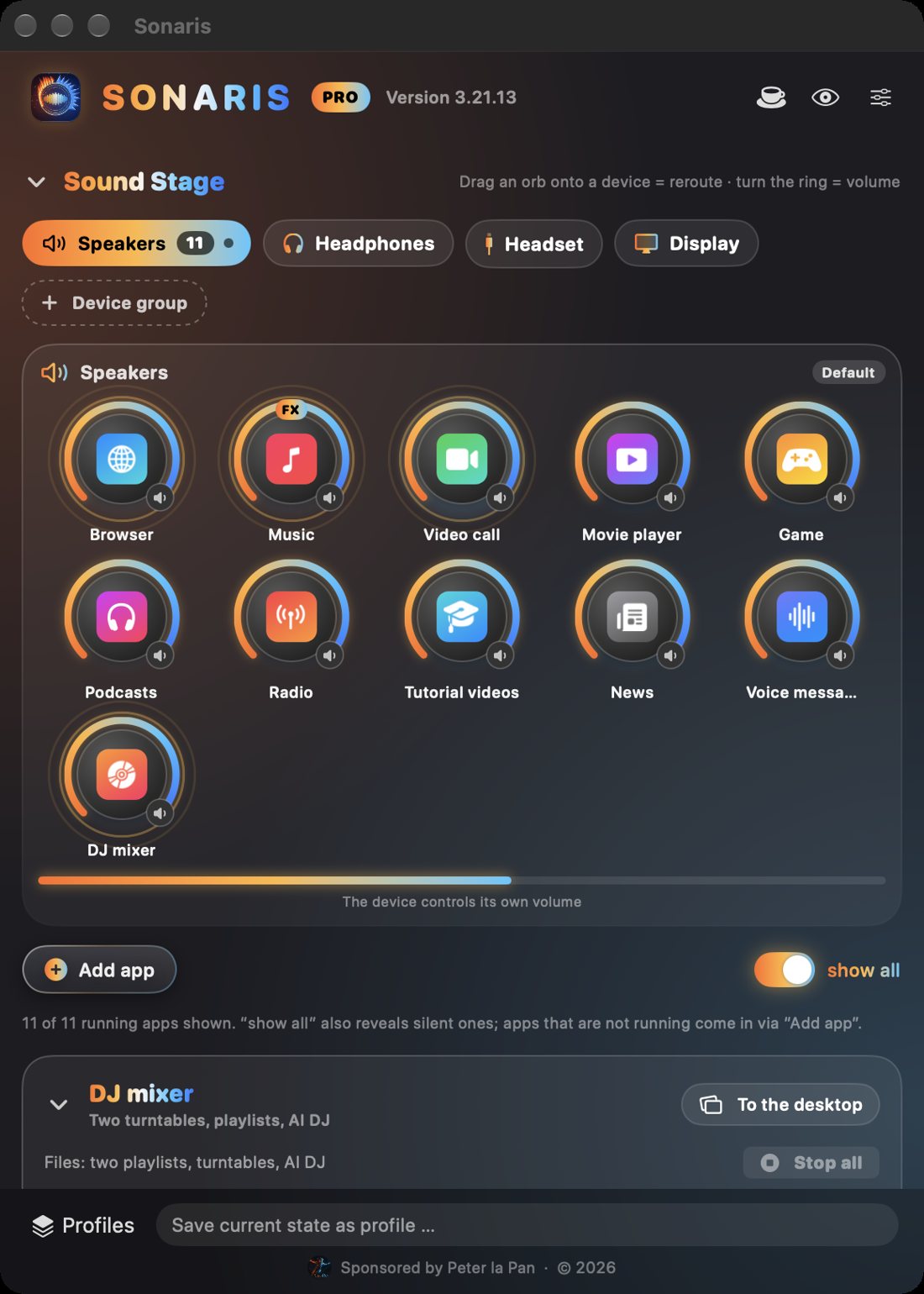
Put apps on devices one by one – and in the mixer keep them apart: one output for everyone, one just for the DJ.

Learn more →
🎛️

Mix at the push of a button

Eleven styles from a smooth blend to ping-pong; the controls visibly do the work.

Learn more →
🌈

See the music

Coloured waveform: bass, drums, melody and vocals – with clickable hot spots.

Learn more →
Last changed – Version 3.21.14 (small change)
  • After “Order with obligation to pay” the secure payment page opens right away – no second click.
  • Nicer order and license key emails with a large payment button.
  • Prices are final prices: VAT is included in the amount shown.
All versions and what has changed →

Everything your sound needs

Easy to use, but with everything the pros want.

🎚️

Every app individually

Volume, equalizer, bass, treble and effects – separately for music, browser, movies and games, including the output device.

Learn more →
🫧

The Sound Stage

Every program is a glowing sphere: turn the ring for volume, drag onto a device to redirect.

Learn more →
💿

DJ mixer with AI DJ

Two decks, coloured waveform, faders, eleven mix styles, headphone cueing and an AI DJ that plays on its own.

Learn more →
🎛️

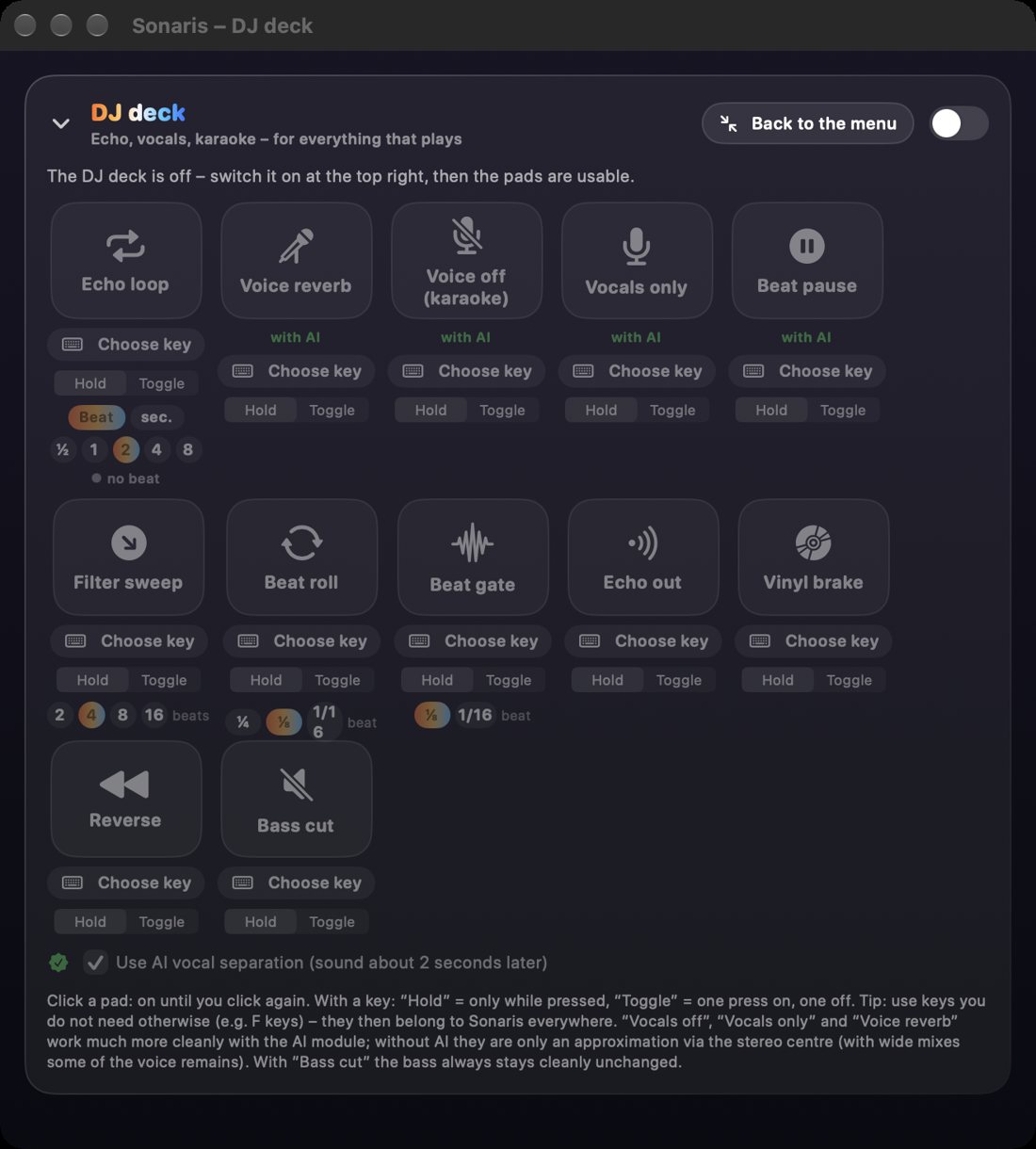
DJ deck: ten effect pads

Echo loop, voice in reverb, karaoke, beat roll, beat gate, vinyl brake and more – on everything that plays on your Mac.

Learn more →
🥁

Sound pads

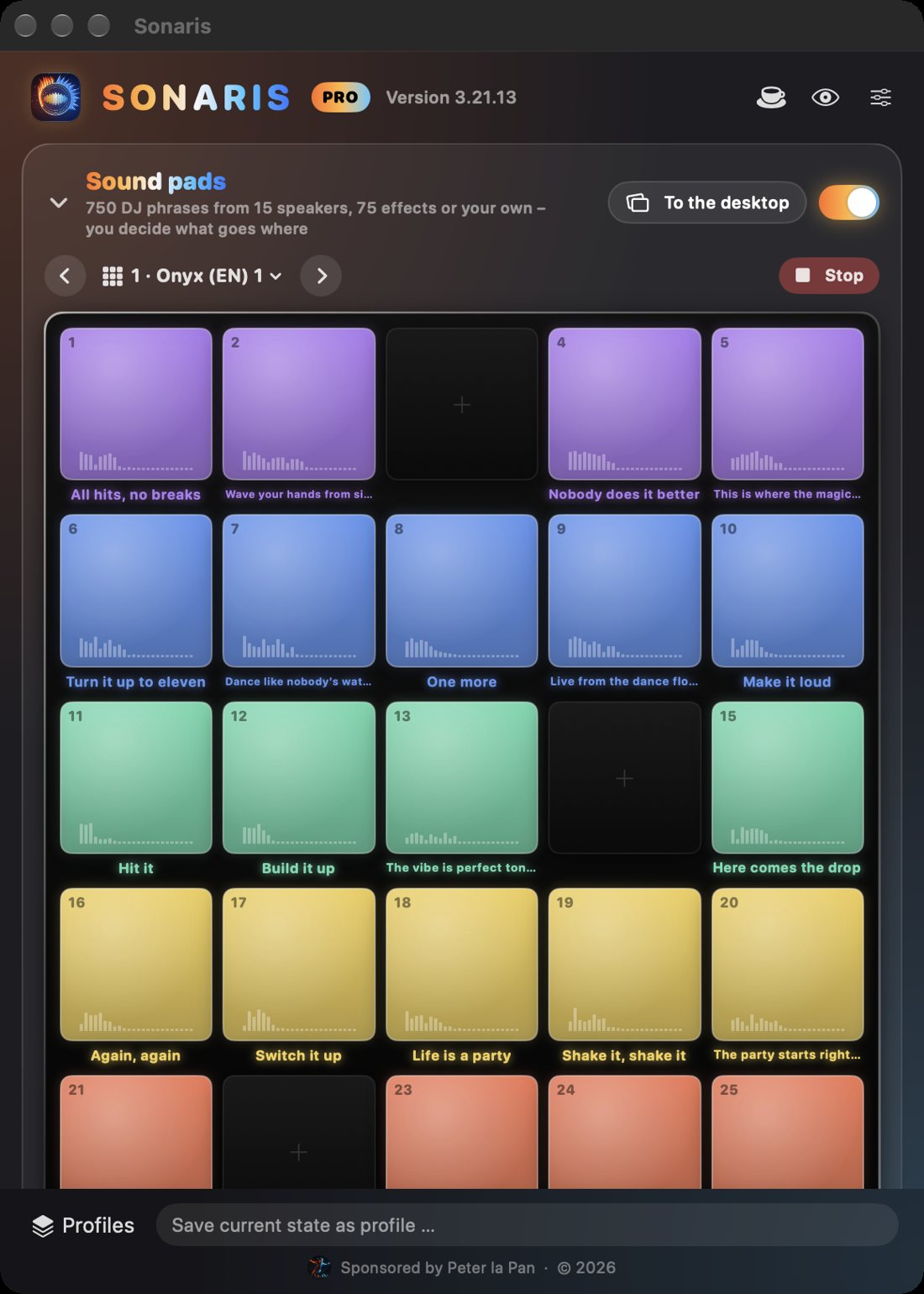
5 × 5 backlit pads with 825 sounds, including 750 DJ phrases from 15 speakers – or your own files and texts.

Learn more →
🎚️

Master Equalizer

28 pro presets from “Call clear” to “Ultra bass” and a curve to draw yourself – for everything that plays.

Learn more →
💎

Crystal clear, even when loud

Limiter with 6 ms look-ahead, Mega and Ultra loudness, auto level and ear protection – measured, not estimated.

Learn more →
📞

Safe phone calls

With Bria, Teams, Zoom & co. Sonaris lets go at once: no silent headset when you answer, and everything comes back by itself afterwards.

Learn more →
🎧

AirPods, devices & groups

New headphones are recognised at once; speakers and headphones can be combined into a group.

Learn more →
🖼️

Sound display

Your pictures pulse in time with the music – 12 styles, 4 colour worlds, freely movable on the desktop.

Learn more →
🪄

Rules, profiles, keys

“When Teams is running …” rules, profiles, keyboard shortcuts, Stream Deck and add-on modules (Audio Units).

Learn more →
🔒

Private and checked by Apple

No driver, no cloud, German and English, Apple-notarised, for Apple silicon and Intel – updates without loss.

Learn more →

Your DJ is already in your Mac NEW

Two decks, mix styles at the push of a button, headphone cueing and an AI DJ you can watch at work. With your own music files.

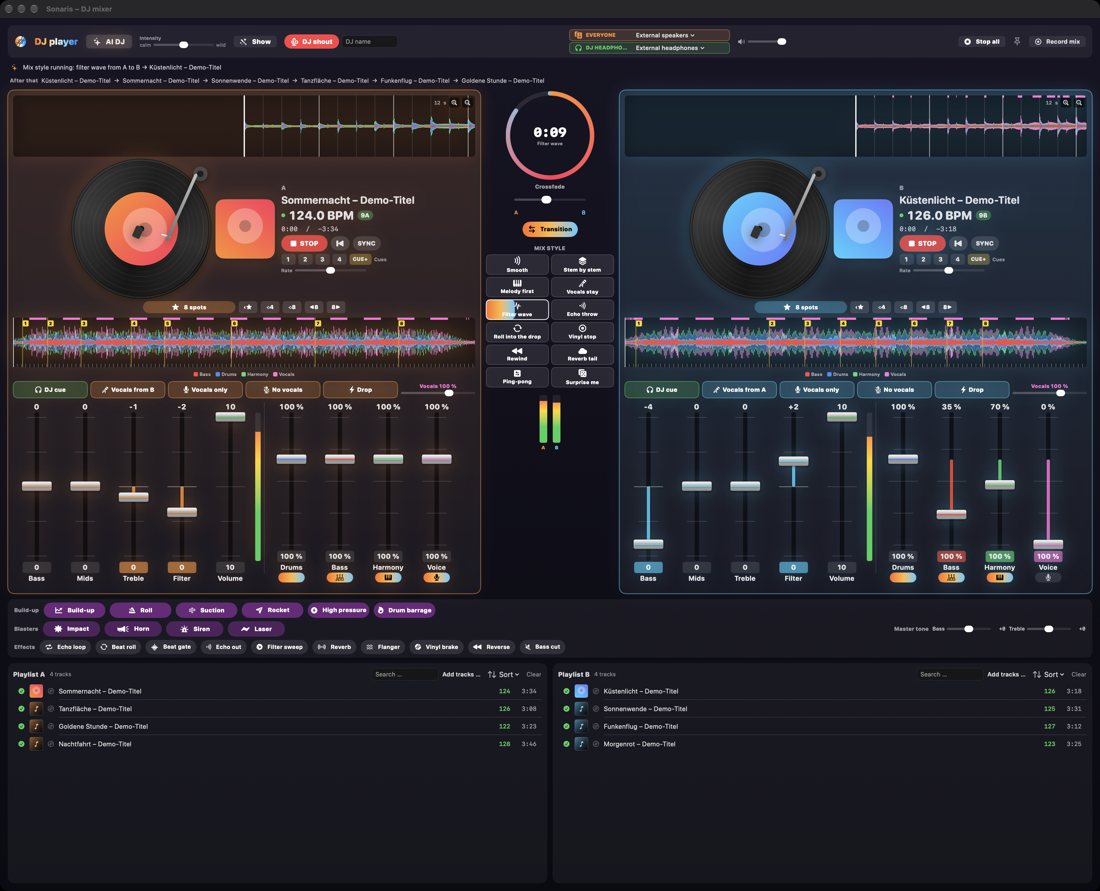
The large DJ mixer with two decks, coloured waveform, faders and mix styles
🎧

Two outputs like in a club

“Everyone” on the speakers, “DJ headphones” just for you: preview a record, find the best spot, then mix it in – the audience notices nothing.

Learn more →
🎛️

11 mix styles per click

Stem by stem, vocals stay, filter wave, echo throw, roll into the drop, vinyl stop, ping-pong and more – or “Surprise me”.

Learn more →
🎚️

Controls that really work

Large faders like on a console. When Sonaris or the AI DJ mixes, you see every move.

Learn more →
🌈

Coloured waveform

Bass, drums, melody and vocals in their own colours: you see where the singing is and jump to the hot spots with one click.

Learn more →
🎤

Swap vocals

Bring over the other song’s vocals – on the beat, downbeat on downbeat, as loud as you like. With the AI module.

Learn more →
✨

AI DJ

It plays on its own: mixes at fitting spots, works the controls, swaps vocals, builds tension and announces tracks with a natural voice.

Learn more →
🚀

Effects with punch

Build-up, roll, suction, rocket, high pressure, drum barrage – plus impact, horn, siren and laser in several variants.

Learn more →
⌨️

Fast like a pro

Tab jumps to the next spot, V puts it on your headphones, Return mixes it in.

Learn more →

The DJ mixer is part of Sonaris Pro. Stems, coloured waveform and vocal swap need the optional AI module (runs entirely on your Mac). Beat and spots are estimates – it works best with dance, pop and electronic music. Playing in public requires the usual music rights. A small version of the mixer is also right in the Sonaris menu.

Listen to the effects 🎧

These are exactly the sounds you fire in the DJ mixer at the push of a button – in time with your music. Headphones on and turn up the volume slowly.

📈

Build-up

⚡️

High pressure

🔥

Drum barrage

🚀

Rocket

💥

Impact

📯

Horn

🚨

Siren

🔫

Laser

Master Equalizer

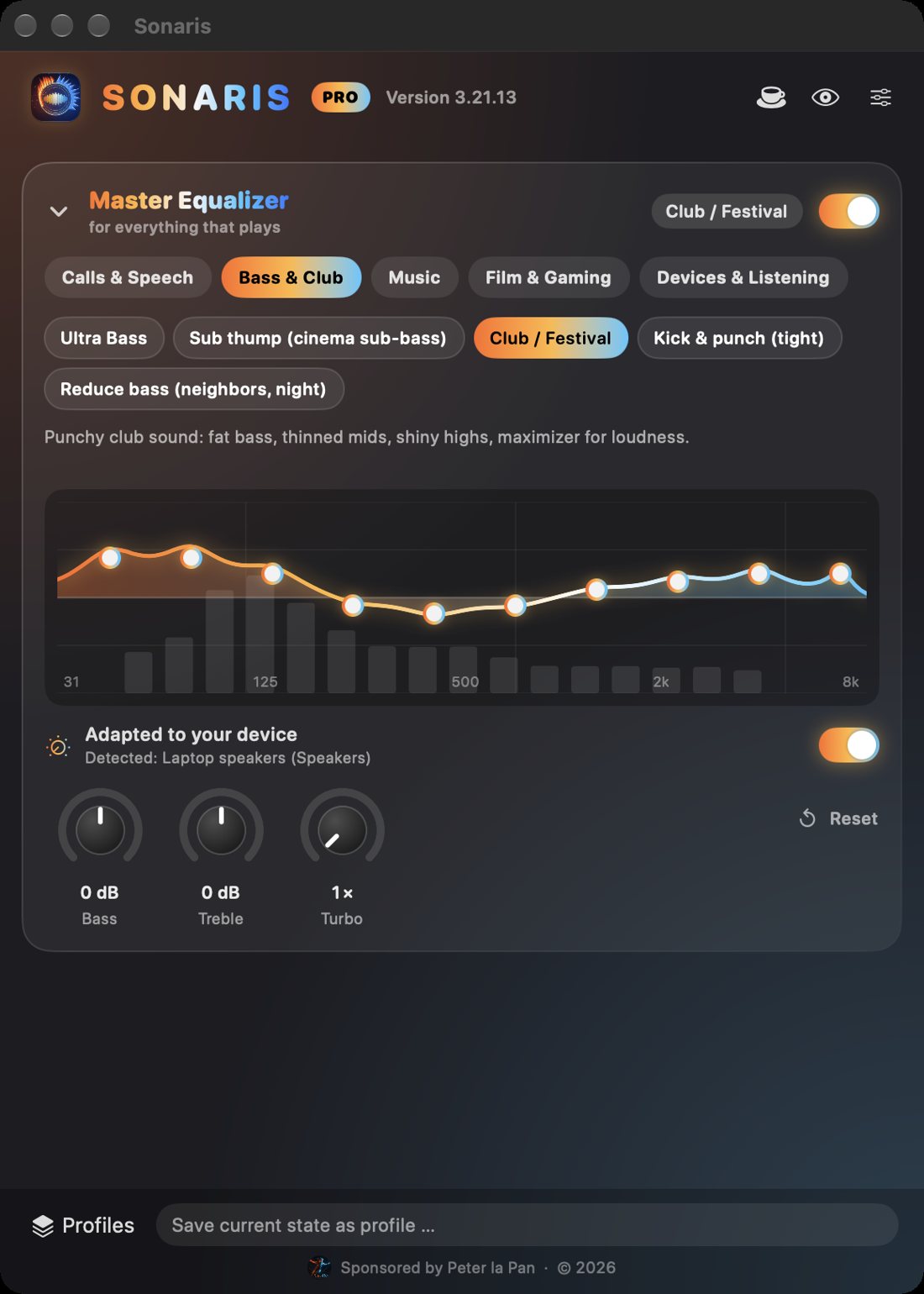
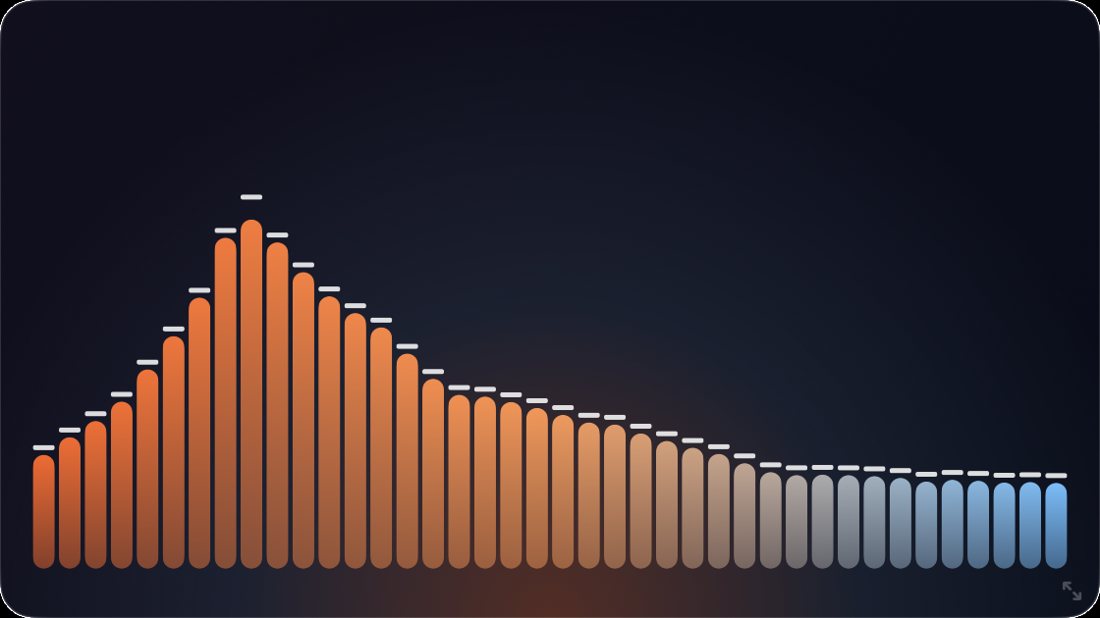
One equalizer for everything that plays. Choose a preset – “Telecom clear” for conferences, “Ultra Bass” for the hi-fi, “Film dialogue”, “Night mode” – and draw the curve yourself if you like. The real spectrum runs behind it.

Sonaris detects whether in-ears, laptop speakers, a display or a hi-fi system are playing, automatically makes room (pre-amplification) and limits the boost to what your device reproduces cleanly. Small speakers get perceived bass through overtones.

Master Equalizer
Sound pads: 5 × 5 backlit DJ pads

Your DJ sampler

Five by five backlit pads like a DJ sampler. 750 catchy DJ phrases from 15 speakers – “Best DJ all over the world!”, “Make some noise for the DJ!”, “Three, two, one, drop!”, “Here come the hot songs to go with the cool drinks!” – plus 75 effects: sirens, airhorns, lasers, rewinds, scratches, drums, basses. You drag any sound onto the pad you want, or put your own files on it. Tap quickly several times: da-da-da-da. Every pad gets its own key – hold or toggle.

Male (deep, cool) or female (soft, sexy) voice – professional AI voices, polished in dropper style. Note: the voices are artificially generated; they are not recordings of real people.

DJ deck: echo, voice, karaoke

Ten big pads for everything that plays on your Mac: Echo loop (the last seconds as an echo over the original – in time, whether 4/4, 6/8 or 3/8), Voice reverb (bass and rhythm stay), Karaoke, Vocals only, Vinyl brake, Reverse, Bass cut, Beat pause (drums out), Filter sweep, Beat roll, Beat gate and Echo out in time. By click or by key: while held or toggled.

With built-in AI – optional: “Voice removal”, “Vocals only” and “Voice reverb” separate much more cleanly with the AI module (about 80 MB, loadable during installation or later and removable at any time; runs entirely on your Mac). Without AI Sonaris stays fully usable – “Voice removal” and “Vocals only” are then a simple approximation via the stereo centre; “Voice reverb” and “Beat pause” exist only with AI. With AI the sound arrives about 2 seconds later. No AI separates 100 %.

DJ deck

Mix running apps too

Choose a running program for channel A and B (for example Apple Music and Spotify) and crossfade in time – with bass swap, filter and vocal transition.

Sound display

Your sound as a picture

Put your own picture on the desktop – it pulses, glows and wobbles in time with your music. Twelve styles from bars to kaleidoscope, four colour themes, freely movable and in any size.

Demo or Pro?

Sonaris runs as a demo without a key. With a valid license it instantly becomes Pro – no reinstallation. If the license expires or is released, it is the demo again; your settings stay saved.

FeatureDemoPro
Appsup to 5unlimited
Devicesup to 3unlimited
Volume, mute, output device per app✓✓
10-band equalizer per app–✓
Master Equalizer with 28 pro presets–✓
Bass, treble, balance, Turbo up to 4×–✓
Effects: compressor, reverb, echo, voice distorter …–✓
Adaptation to your device + clean pre-amplification–✓
Device groups–✓
Profiles & device automation (AirPods)–✓
Sound picture on your desktop✓✓
DJ deck (echo, voice in reverb, karaoke …)–✓
DJ mixer: decks, 11 mix styles, headphone cueing, AI DJ–✓
Sound pads: 5 × 5, 825 sounds, your own files and your own text in 15 voices–✓
Keyboard shortcuts, manual, updates✓✓

Order Sonaris Pro

Choose your plan. One license is valid for one Mac – and can be transferred to another device 3 times. Existing customers save 15% on all plans. Prices incl. statutory VAT.

Your plan:

  or by email: sonaris-bestellung@workers4it.com

You pay securely via Stripe (card, Apple Pay and more). Stripe handles the sale, issues the invoice and remits the VAT. The key is only generated after confirmed payment and sent by email.

Buy us a coffee ☕️

Sonaris is made with a lot of love. If you enjoy it, we would be delighted about a coffee – voluntary, no subscription. Everyone can join in. Thank you!

Payment is handled securely by Stripe. The coffee does not unlock any features and is not a tax-deductible donation.

Download Sonaris 3.21.14

Try Sonaris for free as a demo – if you like it, unlock Pro with a key.

The download is being prepared – please check back shortly.

  1. Open the file and start “Sonaris Install”.
  2. “Let's go” – enter your key or continue as a demo.
  3. On first launch, allow the “System audio recording” permission. Done – Sonaris sits in the menu bar.

✓ Checked and notarized by Apple (notarization) Sonaris is signed with a developer certificate and checked by Apple for malware – macOS opens it without a warning.

Already a buyer? Write a review

Requirements: macOS 14.2 or newer · Apple silicon or Intel · We welcome any feedback at sonaris-support@workers4it.com.

Frequently asked questions

Answered briefly and honestly.

Do I need a driver?

No. Sonaris uses Apple's built-in audio tap from macOS 14.2. Only on first launch does macOS ask once for the “Screen & System Audio Recording” permission.

On how many Macs does my license run?

A license always runs on one Mac at a time. Changing computers: on the old Mac “Release license”, on the new Mac enter the same key. Forgotten? Then Sonaris asks on the new Mac whether the license on the old one should be released – the old Mac then runs as a demo. This works three times (counter 1/3, 2/3, 3/3). Once the counter is full, support can help or you buy a new license.

Do I need internet?

Yes. Sonaris continuously checks the license online (at launch and hourly) – also for updates. A confirmation is valid for 12 hours at most; without a valid internet connection Sonaris then runs only as a demo until you are online again.

What happens when my license expires?

Sonaris shows a notice 14 days beforehand. After that it continues as a demo – your settings stay saved. As an existing customer you get 15% off all plans. The Lifetime license never expires.

How do I pay, and when do I get the key?

You order here or directly in Sonaris and pay securely via Stripe (card, Apple Pay and more). As soon as the payment is confirmed, you receive the license key by email.

Does an update change my settings?

No. Updates only replace the program; settings, Profiles, pictures and license remain untouched, and a backup is made beforehand. Should an update ever need to adjust something, Sonaris asks for your consent first.

Does it work with Spotify, Teams, Zoom, the browser?

Yes, with apps that play through the Mac's audio system. During a call in Teams, Zoom and others, however, Sonaris steps back completely. Protected content from some streaming services in the browser may stay silent depending on the service – we are still looking into this and say so openly.

Are there microphone features?

Input volume is available. Noise gate, microphone equalizer and voice changer on the microphone are planned.

Can I get my data back / what is stored?

We only store what is needed for the license and invoice (name, email, key ID, encrypted device ID). Your sound and your apps never leave your Mac. More in the privacy policy.

Another question? sonaris-support@workers4it.com